Token approvals and wallet disconnection: what remains authorized
Learn why disconnecting a wallet does not necessarily revoke token approvals, how allowances work, what a revocation transaction does, and which network checks matter.
In this guide
Source checked 8 September 2026 · Ethereum-focused security education, not a tool recommendation
The short answer
Disconnecting a wallet from a website usually ends the visible connection between the app and your wallet interface. It does not necessarily remove an on-chain token approval you previously signed. An approval can allow a smart contract or spender to move a specified token amount from your account under the token’s rules. To remove it, you generally need to submit a separate revocation transaction on the relevant network, pay that network’s fee, and verify the correct account, token, spender and chain.
This guide focuses on Ethereum and compatible token-allowance patterns. Other networks, token standards, permit systems, smart-account designs and wallets can behave differently. Treat a revocation tool as another application to evaluate—not as an automatic guarantee that every permission has disappeared.
Disclosure: This is a documentation-based guide. It does not inspect your wallet, identify your approvals, execute a revocation, or recommend a named tool. Never share a private key or recovery phrase with a site claiming to help.
Connection and authorization are different things
When a website connects to a wallet, the site may be able to request account information or ask you to sign messages and transactions. The connection is an interface relationship. You can often end it by clicking “disconnect,” removing a site connection in the wallet, or closing the browser session.
An approval is a blockchain state change. For a common ERC-20 pattern, your account signs a transaction that tells a token contract which spender address may transfer tokens on your behalf, up to an amount. That permission is recorded on-chain. Closing the website does not edit the token contract’s allowance, and deleting a browser tab does not broadcast a revocation transaction.
The distinction matters because a malicious or compromised application may remain able to use an allowance after you have stopped visiting it. The risk depends on the token, spender contract, allowance amount, account, network and contract behavior. A wallet connection that looks inactive is not proof that every prior authorization is gone.
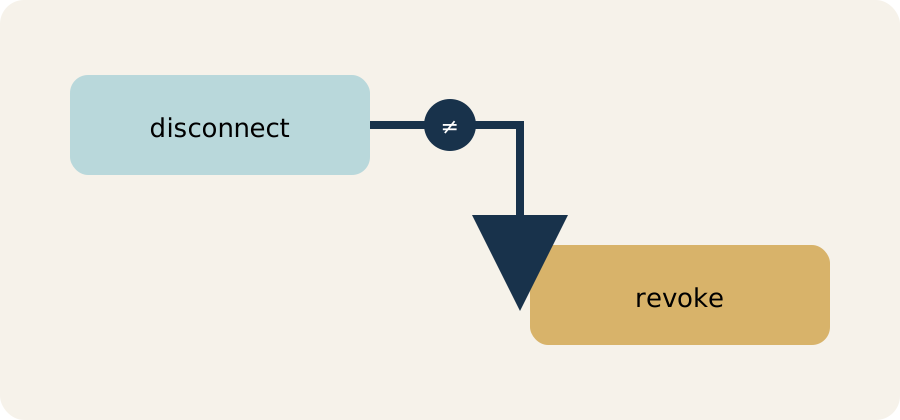
The browser relationship and the blockchain permission are separate layers.
A simple allowance example
Assume you hold 100 units of a token in a self-custody account. A decentralized application asks you to approve a marketplace contract to spend up to 100 units so it can complete a trade. You sign the approval, then later disconnect the application.
The disconnection can stop the app from making new requests through that browser session. It does not, by itself, change the allowance stored by the token contract. If the spender contract is later exploited or behaves maliciously, the remaining allowance may still matter, subject to the token and contract’s rules.
If you submit a revocation that sets the spender’s allowance to zero, the intended result is that the contract can no longer use that allowance for the token and account on that network. The revocation is itself an on-chain transaction. It can fail, remain pending, cost a fee, or be sent from the wrong account if you do not check carefully.
The example is simplified. Some applications use permit signatures, operator approvals, NFT approval functions, smart accounts or custom contract logic rather than one familiar allowance field. “Revoke token approvals” is therefore a task category, not a promise that every permission has the same format.
What a revocation transaction does
On a compatible token-allowance system, revocation changes a permission in the relevant contract. A tool may help you find approvals and prepare a transaction. Your wallet still needs to show what is being signed, from which account, on which network, and with what fee.
Ethereum.org’s guidance emphasizes that revoking access requires a transaction on the network where the permission exists. You cannot remove an Ethereum approval by sending a transaction on a different chain. A token bridged to another network may have a separate contract and separate approval state. An account with the same-looking address on two EVM networks can still have different balances and allowances.
A successful transaction confirmation is evidence that a particular state change was recorded. It is not evidence that every approval for the account is gone, that the application is honest, or that the wallet device is clean. Recheck the allowance after confirmation using a trustworthy block explorer or the wallet’s own permission view, and keep the transaction hash for your records.
Think of the review as an inventory, not a single emergency button. List the accounts you use, the networks they touch and the applications that have received signatures. Check high-value tokens first, then inspect less obvious permissions such as NFT operators or smart-account modules. If you cannot tell what a permission means, pause rather than signing a second transaction simply because a page labels it “safe.” A clean record is useful, but it does not replace protecting the recovery material that controls the account. Keep a dated note of the networks, contract addresses and transaction hashes you reviewed. That helps you spot a new permission later without publishing your public address or balances.
A careful revocation workflow
1. Identify the account and network
Write down the wallet account that signed the original approval and the network where it was made. Do not assume the currently selected account is the one at risk. Check the chain name and, where relevant, the chain identifier. A revocation on the wrong network cannot change the original permission.
2. Identify the token and spender
Verify the token contract address, not only the token symbol. Verify the spender contract address and compare it with a trusted source such as the application’s official documentation or a reputable explorer record. Similar names and fake websites are common phishing tactics.
3. Review the allowance scope
Look for the approved amount, token, spender and last activity. An unlimited allowance can be more consequential than a small, bounded allowance, but a small allowance can still matter if the asset is valuable or approvals accumulate. A zero balance today does not necessarily make an old allowance irrelevant if you later receive the same token.
4. Use a permission view you understand
A revocation site can itself request a wallet connection or signature. Confirm the domain, security information, supported network and transaction preview. Never enter a seed phrase or private key into a browser page, support chat or form. A legitimate revocation flow should not need your secret recovery material.
5. Confirm the transaction details
Before signing, check the account, network, token, spender and intended new allowance. Read the network fee and make sure the wallet holds the network’s native asset if one is needed for gas. A fee estimate can change before confirmation; it is not a guarantee of final cost.
6. Verify after confirmation
Wait for the transaction to confirm, then inspect the allowance again. If it failed or remains pending, do not assume the permission changed. Save the transaction hash and note which network and account you checked.
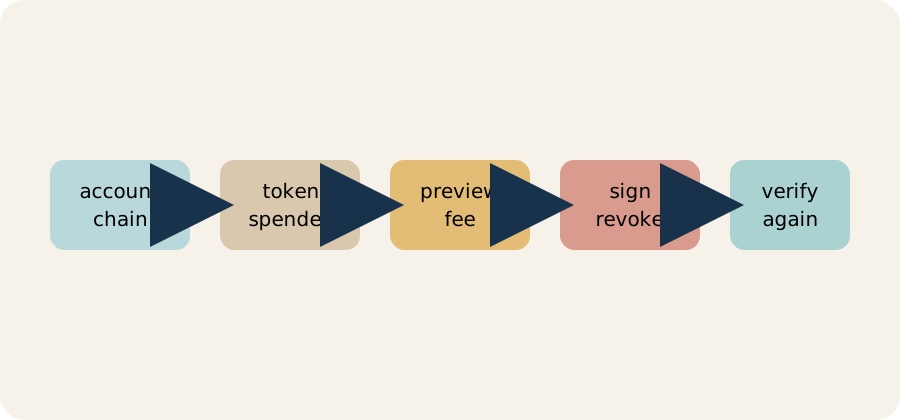
Check the account and chain, identify token and spender, preview the fee, sign the revocation, then verify the allowance again.
7. Disconnect separately
After revoking what you intend to revoke, disconnect the website from the wallet interface. This reduces future connection prompts but is a separate action. Review active connections in the wallet and browser, remove suspicious extensions, and update the wallet software from its official source.
Common mistakes
Mistake 1: assuming disconnection equals revocation
The browser relationship and the blockchain permission are different layers. Disconnecting is sensible hygiene, but it does not substitute for checking allowances.
Mistake 2: revoking on the wrong chain
A wallet can display a similar address across EVM networks. Allowances are network-specific. Confirm the chain before reviewing or signing.
Mistake 3: trusting a search ad or support message
Scammers can imitate explorers, wallet providers and support staff. Navigate from a saved official source, check the domain character by character, and never disclose your recovery phrase.
Mistake 4: believing zero allowance fixes a compromised wallet
Revoking one token approval does not remove malware, reveal a stolen seed phrase, cancel a signed transaction, or repair a compromised device. If secret credentials may be exposed, the response can require moving assets to a newly created secure wallet—but that decision has its own operational and transaction risks.
Mistake 5: assuming every approval appears in one list
Permit signatures, NFT operators, smart-account modules and application-specific permissions may not use the same allowance interface. The tool you use may cover only particular standards or networks.
A practical checklist
- Record the wallet account and network before acting.
- Verify token and spender contract addresses from trusted sources.
- Distinguish a website connection, token allowance and signed transaction.
- Review whether the allowance is bounded or unlimited.
- Use a reputable, current permission view; treat it as software with its own risks.
- Confirm the transaction preview and network fee in your wallet.
- Never enter a seed phrase or private key to revoke an approval.
- Wait for confirmation and recheck the allowance on the same network.
- Disconnect the website after the on-chain review; do not confuse the actions.
- Reassess other chains, tokens, NFTs and smart-account permissions separately.
What revocation cannot undo
Revocation is forward-looking. It can change a permission that remains available, but it cannot reverse a transfer already confirmed, recover assets sent to the wrong address, refund a network fee, or erase a copy of a private key that was exposed. It also cannot make a malicious website trustworthy or prove that your device has no malware.
If you signed an unexpected transaction, stop interacting with the site, preserve transaction details, review approvals and consider getting qualified technical help. Do not follow a stranger’s recovery instructions or pay a fee to someone promising to “unlock” funds. No general revocation page can guarantee recovery.
Limits and next steps
This guide is intentionally narrow. K-0061 covers Ethereum and compatible allowance systems, not every blockchain, token standard, bridge, permit scheme or account abstraction. Read the relevant contract and wallet documentation for the network you use. Fees, explorer interfaces and wallet controls can change.
For broader wallet hygiene, see the crypto wallet security checklist. To understand who controls the keys, read exchange custody vs self-custody. These are educational starting points, not personalized financial or security advice.