Portfolio tracking apps compared: Empower, Monarch and Kubera
Compare Empower Personal Dashboard, Monarch Money and Kubera by documented focus, cost model, portfolio visibility and reader-fit questions.
In this comparison



Empower Personal Dashboard, Monarch Money and Kubera all help people see financial information in one place, but they are built around different jobs. Empower emphasizes free planning, net-worth and investment views; Monarch combines budgeting, household organization and investment tracking; Kubera emphasizes a broad balance-sheet view that can include alternative assets and multiple currencies.
There is no overall winner in this comparison. The useful question is which documented focus matches the information you need, the accounts you can connect, the price you accept and the privacy trade-offs you understand. This is a documentation review, not hands-on testing: no account was opened, funded, linked or used to verify refreshes, calculations or support.
In short: choose by job and evidence. Check current access, pricing, data connections, security terms and the exact account support before relying on any dashboard.
What a portfolio tracker can and cannot do
A tracker can aggregate balances, holdings, transactions or other assets and make a complex picture easier to review. It does not make the underlying investments safer, diversify a concentrated portfolio or provide a guaranteed valuation. Data can be delayed, incomplete or classified differently across institutions. A calculated net-worth line is a convenience for review, not a substitute for statements or tax records.
The three products also have different boundaries. Empower’s Personal Dashboard is described as a free experience for budgeting, planning, retirement and connected accounts. Monarch presents a paid personal-finance service with budgeting, tracking and investment features. Kubera presents itself as a net-worth and portfolio tracker designed to include a wide range of assets. These descriptions come from their own pages, not an independent usability test.
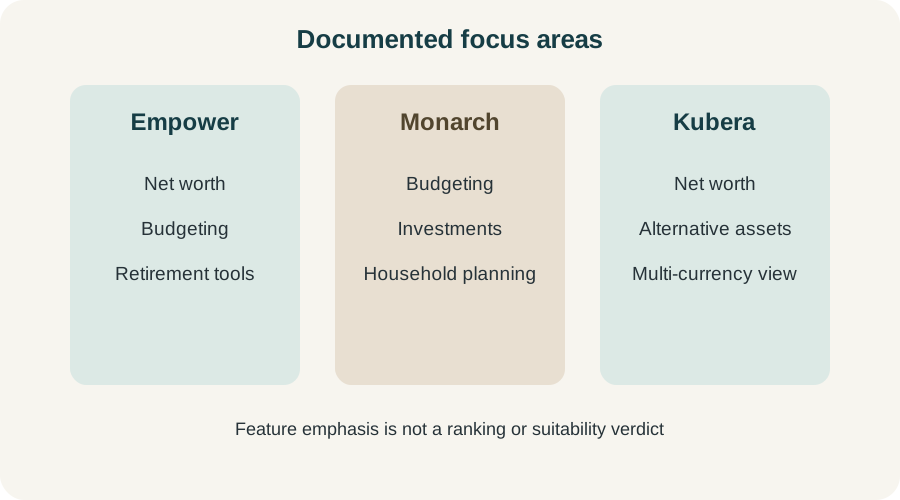
Feature emphasis is a reader-fit aid, not a ranking or suitability verdict.
Empower Personal Dashboard
Empower’s official tools page says Personal Dashboard helps with budgeting, planning and retirement decisions, and can connect investments, cash, credit and other accounts. Its support documentation describes an overview with net worth and links to more detailed sections. Empower’s terms describe financial-account aggregation of balances, transactions and holdings from institutions a user designates.
The documented fit is a reader who wants a broad, free starting view of spending, net worth, investments and retirement planning. A portfolio-oriented reader may value the investment allocation and net-worth views, while someone focused on household budgeting should verify the current budgeting depth and account connection behavior.
Empower also has separate paid advisory and wealth-management offerings. Do not assume that features, fees or obligations described for Personal Dashboard apply to an advisory relationship. The free dashboard page and advisory pages are different products and should be evaluated separately.
Check before relying on it: whether your institutions connect, how often data refreshes, which holdings and liabilities are included, what permissions are required, and how the service handles privacy and security. Empower says it uses encryption and multifactor authentication; that is a provider statement, not an independent security audit.
Monarch Money
Monarch’s pricing page presents a subscription service, while its help documentation describes tracking, budgeting and planning features. Its investments documentation says users can view securities, ticker symbols, names, price history and portfolio performance calculations. The same documentation warns that purchase dates and acquisition prices may not always be available from financial institutions, which affects how performance charts are interpreted.
The documented fit is a reader who wants budgeting and household organization alongside investment tracking. Couples or households may care about shared workflows, categories and goals; an investor should still inspect how connected accounts classify holdings and whether the performance view uses complete cost-basis information.
Monarch is not free by default in the way Empower Personal Dashboard is described. Pricing can change, and a subscription decision should use the current official page rather than an old review or promotion. A subscription also does not guarantee that every institution, security type or account field will connect correctly.
Check before relying on it: current monthly or annual price, trial and renewal terms, supported institutions, manual-account options, data deletion controls, investment calculation assumptions and whether the household features are useful for your situation.
Kubera
Kubera’s official homepage describes a net-worth tracker with live price feeds and an AI appraiser for other assets. Its help page contrasts Kubera with budgeting-first tools and describes an all-in-one portfolio and net-worth tracker. The site also presents support for alternative assets and a base currency per portfolio.
The documented fit is a reader who wants a broad balance-sheet view that may include investments, private or alternative assets, property-like entries and multiple currencies. That breadth can be useful for a complex household, but it also increases the need to verify how each asset is valued, how often a feed updates and whether an estimate is clearly labeled as an estimate.
Kubera’s pricing and product terms should be checked on the current official site. “Live” feeds still depend on the source and asset type; an appraiser’s estimate is not a transaction quote or an audited valuation. Treat unusual assets, private holdings and manually entered values with extra caution.
Check before relying on it: current subscription price, supported feeds, manual valuation controls, currency conversion assumptions, privacy terms and export or deletion options.
A neutral way to compare the three
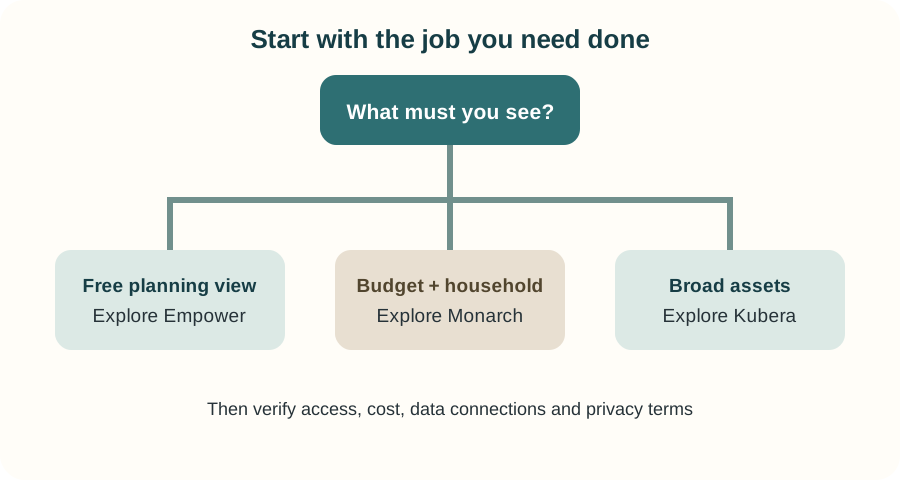
Start with the information job, then verify access, cost, data connections and privacy.
Scroll sideways or use arrow keys to read the full table.
| Question | Empower Personal Dashboard | Monarch Money | Kubera |
|---|---|---|---|
| Documented center of gravity | Free planning, net worth and investments | Budgeting, household planning and investments | Net worth, portfolios and broad asset types |
| Cost model to verify | Dashboard described as free; separate advisory products exist | Subscription pricing on official page | Subscription pricing on official site |
| Portfolio review questions | Allocation view, balances, holdings and refresh | Holdings, performance assumptions and account coverage | Valuation source, alternative assets and currency handling |
| Main uncertainty | Connection coverage and separation from advisory products | Subscription value and incomplete cost-basis data | Estimates, feed coverage and complex-asset valuation |
The table summarizes provider documentation; it does not score quality. Product features, pricing and supported institutions can change.
How to test fit without outsourcing judgment
- Name the job. Is it net worth, budgeting, allocation review, alternative assets or a combination?
- List the accounts. Include banks, brokers, retirement plans, debts and manually tracked assets.
- Read connection disclosures. Confirm the institution, data fields, refresh behavior and permissions.
- Check the cost. Record the current subscription, renewal, trial and any separate advisory fee.
- Inspect the calculation. Understand whether performance uses complete purchase data, estimates or current-value assumptions.
- Review privacy and security. Read the provider’s terms, encryption language, multifactor controls, deletion and export options.
- Keep primary records. Compare important balances and tax information with statements from the institution.
- Revisit the portfolio itself. A dashboard can reveal drift, but the portfolio rebalancing guide explains why review does not equal an automatic trade.
For allocation context, read asset allocation vs. diversification and diversification. For cost questions, see investment fees. Continue through the Portfolio Strategy learning path.
Risks and limits
Account aggregation creates dependency on data connections and permissions. A missing or stale feed can make a dashboard look complete when it is not. Asset prices can be delayed; private or unusual assets may be estimates; classifications can differ by provider. Security features described by a company are not a guarantee against every breach or unauthorized transaction.
Do not use a tracker as the sole record for taxes, legal ownership, beneficiary designations or a high-consequence investment decision. Check original statements and current product documents. If the consequences are material or unclear, qualified local financial or tax advice may be appropriate.
Takeaway
Empower, Monarch and Kubera overlap in the broad idea of seeing finances together, but their documented centers of gravity differ. Empower is the free planning-oriented starting point; Monarch is the subscription household-finance option with investment tracking; Kubera is the broad net-worth and alternative-asset tracker. Those are reader-fit descriptions, not rankings or recommendations.
This article is general education, not personalized investment, tax or legal advice. Product facts and pricing can change. Official pages were checked on 2026-09-08.